How I Booked 5 Meetings From Cold Email
No bought leads, no Apollo. I built the list myself — and it booked real meetings. Here's the campaign, and the list-building behind it.
Here's the result first, because the result is the whole point: I ran a cold email campaign to a niche that isn't in any B2B database, and it booked 5 meetings — from a list I built myself, with no bought leads and no Apollo.
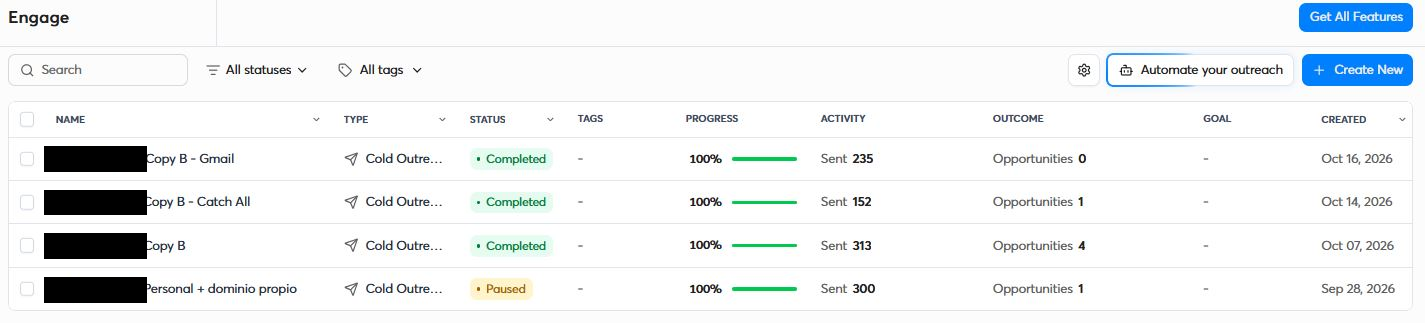
Four campaigns, about 1,000 emails, a 44% positive reply rate on the winning one, and a bounce rate under half a percent. These are the real campaigns (I've only hidden the niche and one dollar figure):
The copy mattered. But what actually made those meetings possible was the list — who I emailed, and how sure I was that each address was real. That's the part I'm going to walk through, because it's the part you can copy.
Why the list decides everything
Before a word of your copy gets read, your list decides two things: whether you land in the inbox or the spam folder, and whether your sending domain survives the month. Email a pile of dead addresses and mailbox providers read it as "this sender doesn't know who they're emailing" — your reputation drops, and even your good emails start going to spam.
So the job isn't "collect as many emails as possible." It's "only send to addresses I'm confident are real." Every number above comes from that one rule.
The rules I set before I started
- 1No B2B database. Public directories and raw scraping only.
- 2One email per person. No sequences — I wanted to learn fast.
- 3Plain text. No tracking, no links, no attachments, one step.
- 4Personal, own-domain addresses only (name@company.com). No info@, and no Gmail/Hotmail.
- 5Three domains, three inboxes, two-week warmup, then 20 emails/day per inbox.
- 6Call every real opportunity by phone.
Phase 1 — Build the list from public data
I picked a niche of established local service businesses — easy to find in public, industry-specific directories, but the kind of small local firms the big databases barely cover.
I pulled records from the official directories for that niche and combined them with Google Maps. Each source got scraped with simple scripts, and then — the step most people skip — I unified everything with a single key. In my niche the obvious identifiers repeated across regions, so I had to dedupe on a combination of fields. Skip this and you email the same person twice, or merge two different ones.
That left a master list of a few thousand records. Some had an email. Many had only a name and a website.
The big B2B database didn't help here. I checked — coverage for small local firms in this market was poor, full of blanks and stale data. If you sell to local SMBs, you've probably hit the same wall. This is the first place MatchKraft earned its spot. (Related: why bought email lists go stale.)
Phase 2 — Find the missing emails
For every record with a name and a website but no email, I used MatchKraft's Email Finder: first name, last name, company domain → the real, verified address.
That recovered 156 valid emails that existed in no directory I'd scraped — 156 more real people I could reach, pulled out of records that would otherwise have been dead weight.
Phase 3 — Validate and segment (the part that protected the domain)
Now the important part. I ran every address — from the directories and the ones I'd found — through MatchKraft's Email Verifier. The full list came back like this:
| Status | Count | What it means |
|---|---|---|
| Verified | 2,190 | Mailbox confirmed. Safe to send. |
| Verified / Accept-All | 247 | Catch-all domain, but confirmed by independent evidence. |
| Unknown | 410 | Not enough signal to be sure. Don't guess — hold back. |
| Invalid | 320 | Mailbox doesn't exist. Dropped on the spot. |
Those 320 Invalids are 320 bounces I never sent — that alone is most of the story behind the bounce rate.
Then I segmented what was left by two questions: personal or role? (juan.perez@ vs info@) and own domain or free inbox? (@company.com vs @gmail.com). Crossed with the validation status, the gold tier was personal + own-domain + Verified (or Verified/Accept-All). I also cross-checked the whole list against my CRM and existing customers before loading a single campaign.
Phase 4 — The send, and the meetings
The sending setup was deliberately boring: three secondary domains, warmed inboxes, 20 emails/day each, business hours only, plain text. I tested two copies — one task-focused, one short and in first person with a little social proof. (I won't share the copy itself, but the short, low-pressure one won, clearly.)
Here's the winning campaign up close — 313 emails, 7 unique replies, and 4 opportunities:
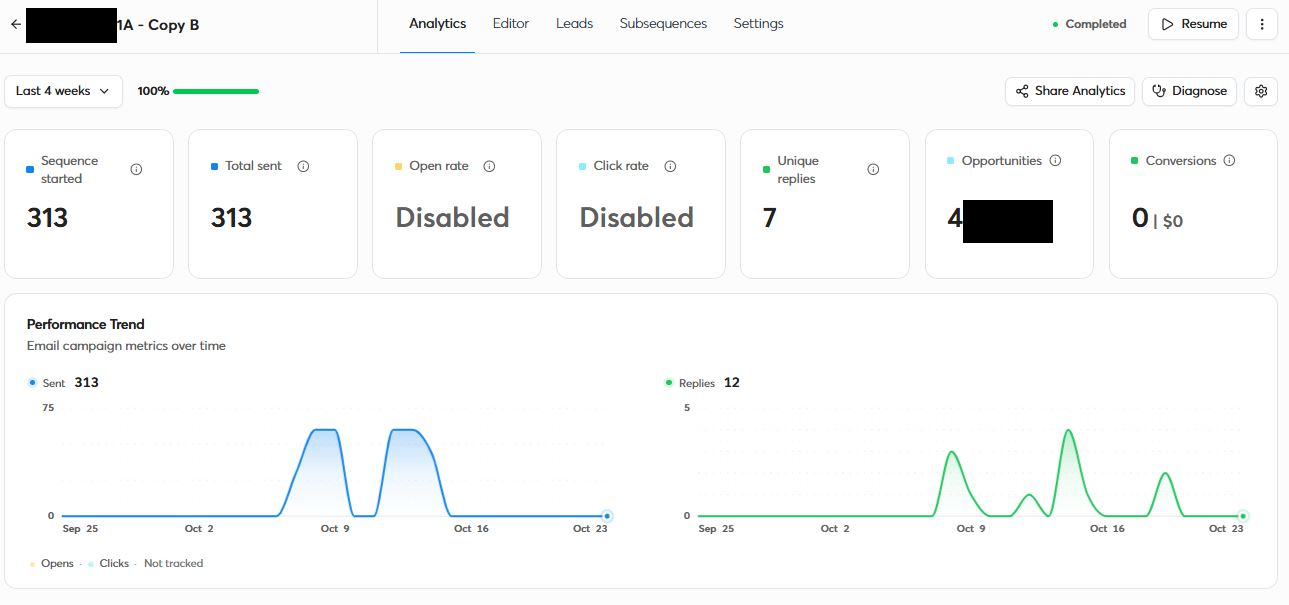
And of the people who replied, 44% replied positively:

Across the four campaigns, those replies turned into 5 booked meetings (I track meetings in my CRM, not the email tool, so that field reads zero there — the meetings were real). Two results from the campaign comparison up top are the whole lesson:
- The catch-all campaign — 152 emails to catch-all domains most tools won't even touch — produced an opportunity and a meeting, with almost no bounces.
- The Gmail/Hotmail campaign — 235 emails — produced zero. No opportunities, no meetings.
What actually made it work
Three decisions did the heavy lifting — and two of them are things most "email finders" get wrong.
1. I only sent to confirmed mailboxes.
Verified and Verified/Accept-All only. The 320 Invalids and 410 Unknowns never got a send.
2. "Unknown" is a feature, not a failure.
Mid-campaign I hit the case that sums up why verification quality beats a green checkmark: an address that passed three other validators as "valid" bounced back with NoSuchUser. MatchKraft had flagged that same address as not sure. I'd rather a tool tell me "I can't confirm this" and let me hold it than hand me a confident false positive that burns my domain. Honest "Unknown" beats a fake "valid" every time.
3. Catch-all emails aren't garbage.
This surprised me. That catch-all campaign went entirely to domains most tools skip or mark unverifiable. MatchKraft had confirmed them as Verified/Accept-All using independent evidence, not a guess — and they converted. If you throw away every catch-all address, you're throwing away reachable, interested people. (More here: what a catch-all email really is.)
And the thing that didn't work, so you don't repeat it: personal Gmail/Hotmail addresses are dead weight for B2B. 235 sends, zero replies. For business outreach, those are abandoned or barely-read inboxes. I won't send to them again.
The short version
- Your list — not your copy — controls your bounce rate, your inbox placement, and whether anyone replies at all.
- Drop Invalids. Hold Unknowns. Never send to an address you can't confirm.
- Keep catch-alls that are independently verified. They convert.
- Skip personal Gmail/Hotmail for B2B. Own domains only.
- A good finder + public directories beats a generic B2B database for local and niche markets.
I built a few-thousand-contact list for a niche that's in no B2B database, sent about a thousand cold emails, kept the bounce rate under half a percent, and booked 5 meetings. The copy helped — but the list is what made any of it possible. The finding and the validating were MatchKraft.
Build a list clean enough to get replies
Find the contacts public databases miss, and verify every address — catch-alls included — before you send. Free plan included, no credit card.
Try it for free